At the table?Behind the counter?
Scan the QR on your table and read the menu on your phone, no app to install.
- 14-day trial
- No app to install
- Print-ready QR codes
Animated example. An order from table 1, a Turkish coffee and a pine nut mint tea for 10.000 DT, goes from pending to confirmed, then to preparing.
Example order. Demo data.
- Menu in up to 3 languages, Arabic included
- Change a price in seconds
- Mark a dish sold out in one tap
- Call the waiter from the table
- Online reservations
What brings you here?
The sections below adapt to your choice.
What you get
At your table, on your phone.
Menu, no app
Scan the QR on your table. The menu opens in your browser, nothing to install.
Order from your table
Build your order on your phone. Staff receive it with your table number.
Call the waiter
One tap and the team is notified, no waving required.
An AI waiter
Ask for a dish or drink idea. It answers from the venue's real menu.
Play with other tables
Multiplayer games and a chat between guests, without leaving the menu.
Book a table
Ask for a table for a meeting or a birthday, right from the menu.
For your venue, from one dashboard.
A menu you change in one tap
Edit a price, mark a dish sold out, add a dish. Guests see it on the next scan, in French, Arabic or English depending on your plan.
A QR per table, with table tents
A QR for every table, with printable table tents, sticker sheets and a poster.
Orders at the counter
Table orders arrive in your dashboard, and in the desktop app at the counter.
Your numbers
Scans, best sellers and peak hours, in the dashboard.
Reservations
Receive meeting and birthday requests and manage them in one place.
AI advice
Suggestions based on your numbers to fine-tune your menu.
How it works
Five steps, nothing to install.
Scan
The QR on your table opens the menu in your browser.
Pick your language
Switch between French, Arabic and English when the venue offers them.
Order or call
Send your order or call the waiter from your seat.
Play with the table
A game while you wait, alone or with another table depending on the venue.
Collect your points
When the venue runs a loyalty programme, earn points and show your code at the counter.
Five steps, from sign-up to your numbers.
Sign up
Create your account. Our team validates it within 24 hours.
Add your dishes
Categories, prices, photos and translations, from the dashboard.
Print your QR codes
One QR for your venue, and one per table on the Pro plan. Table tents and sticker sheets ready to print.
Receive orders
Follow orders and waiter calls in the dashboard.
Follow your numbers
Scans, best sellers and peak hours at a glance.
The product as it is
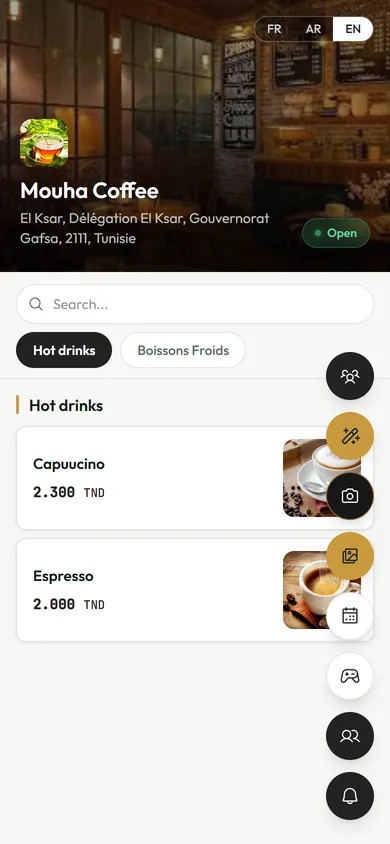
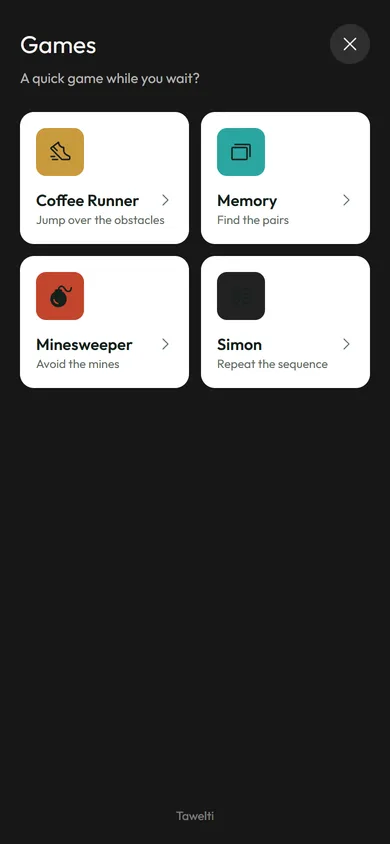
The venue's menu, on your phone.
These screens come from the demo menu: the prices, photos and games are the real product.
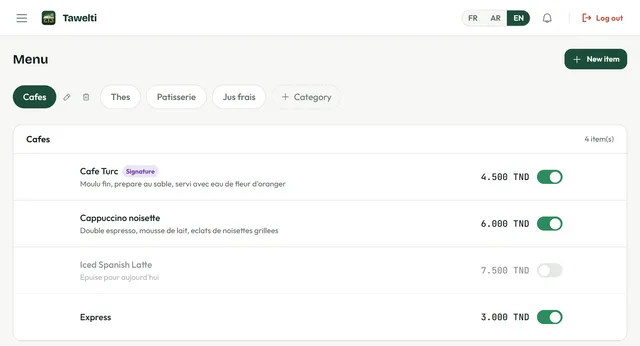
Your menu, under your control.
The demo dashboard: every dish has its price and a switch. Turn a dish off when it sells out.
What changes
- What you know
A PDF menu to reprint
With TaweltiChange a price, live on the next scan
- What you know
Prices that are out of date
With TaweltiMark a dish sold out in one tap
- What you know
A QR that opens a blurry photo
With TaweltiA real, readable menu, in several languages
- What you know
Waving down the waiter
With TaweltiCall the waiter from the table
Pick your plan
Start with a 14-day free trial.
Trial
- Dishes
- 20
- Categories
- 5
- Menu languages
- 1 (French)
- Tawelti watermark
- Yes
- QR per table
- No
- Statistics
- No
- AI waiter and games between tables
- No
Standard
- Dishes
- 100
- Categories
- 20
- Menu languages
- 2
- Tawelti watermark
- No
- QR per table
- No
- Statistics
- No
- AI waiter and games between tables
- No
Pro
Pro- Dishes
- Unlimited
- Categories
- Unlimited
- Menu languages
- 3 (French, Arabic, English)
- Tawelti watermark
- No
- QR per table
- Yes
- Statistics
- Yes
- AI waiter and games between tables
- Yes
Every plan includes the menu without an app, the waiter call and reservations.
What Tawelti does not do
Better to know before you sign up.
- No online payment: guests pay at the venue.
- No delivery.
- No offline mode: a connection is needed.
- No kitchen display.
- No automatic posting to Instagram.
- A menu change shows on the next scan, not live.
Your data
- Google sign-in is used only to authenticate you.
- We never sell or share your personal data.
- To use your rights, write to us: we reply within 30 days.
Write to us: [email protected]
Frequently asked questions
Do I need to install an app?
No. The menu opens in your browser after scanning the QR code. There is also an iPhone app, to keep track of your loyalty and rewards.
When do guests see a changed price?
On the next scan. The menu is not pushed live: a guest who already opened it sees the update when they reopen it.
Which languages are available?
The menu can exist in French, Arabic (read right to left) and English. The number of languages depends on the plan: one for the trial, two for Standard, three for Pro.
Can I print my QR codes?
Yes. Tawelti generates your venue's QR with table tents, sticker sheets and a poster to print. A QR per table is reserved for the Pro plan.
How does sign-up work?
You create your account, then our team validates it within 24 hours.
How much does Tawelti cost?
The 14-day trial is free. After that, Standard costs 50.000 DT a month or 500.000 DT one time, and Pro 100.000 DT a month or 1000.000 DT one time.
Can guests order and pay?
On the Pro plan, guests send their order from the table. There is no online payment: they pay at the venue.
Is my data sold?
No. Google sign-in is used only for authentication, and we never sell or share your personal data.
A question? Write to us.
Ask your question or describe what you need, and we will reply.
Or write directly to [email protected]